HVAC software Keep your HVAC techs booked when it’s slow.
Members get tune-up reminders, so your office can fill the board in shoulder season.
30-minute demo, then 14 days free We set it all up. Most office staff and techs pick it up in a day.

Atlas Air Comfort, our own heating and air shop, runs on WorkflowPros, and so do our plumbing, electrical, and appliance repair shops.




Tune-ups and changeouts that never make it onto the board
Tune-ups nobody remembers to book
Set up what your plan covers, like an AC tune-up in spring and a furnace tune-up in fall. When one’s due, the app reminds the member and your office books the visit.
Changeouts you hear about too late
The app reads each unit’s age off your tech’s photo of the data plate and flags the old ones, so your office can call those customers before the first heat wave or cold snap.
“Let me think about it” on a new system
Your office sees who opened the proposal and which option they looked at, and calls them first.
A furnace that hums, then shuts off
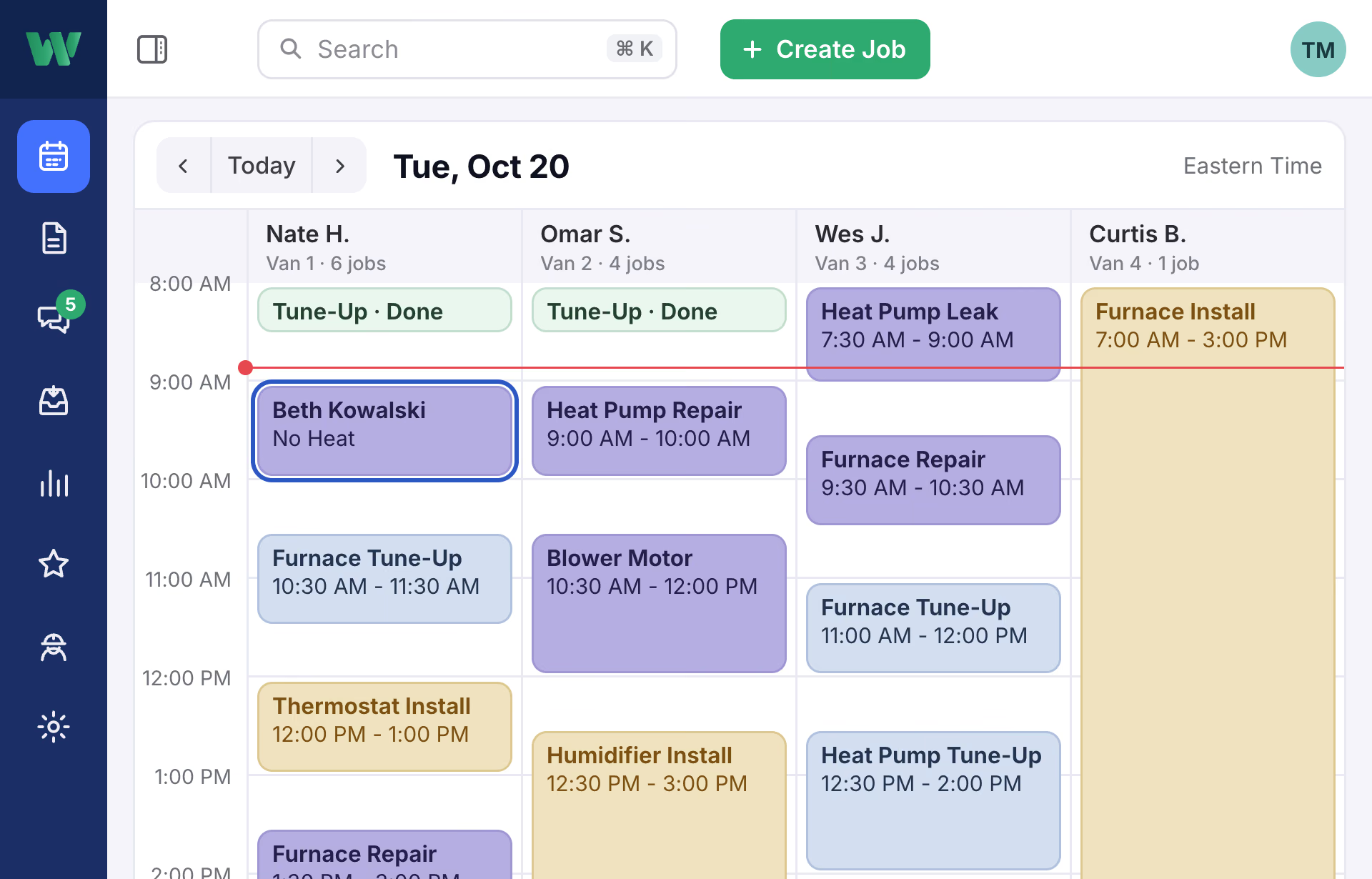
Beth Kowalski calls Tuesday with no heat.
- 1 · Office
Writes up the no-heat call
Tasha pulls up Beth’s file and sees a 2013 furnace, out of warranty. She writes down the three blinks and texts Beth a 9-to-10 window.

- 2 · Office
Puts Nate on it
Tasha drags it to Nate’s 9 o’clock. It’s on his phone as he finishes Walt’s tune-up.

- 3 · Tech
Reads Tasha’s note
Three blinks usually means the pressure switch, so Nate knows where to start.

- 4 · Tech
Closes it out
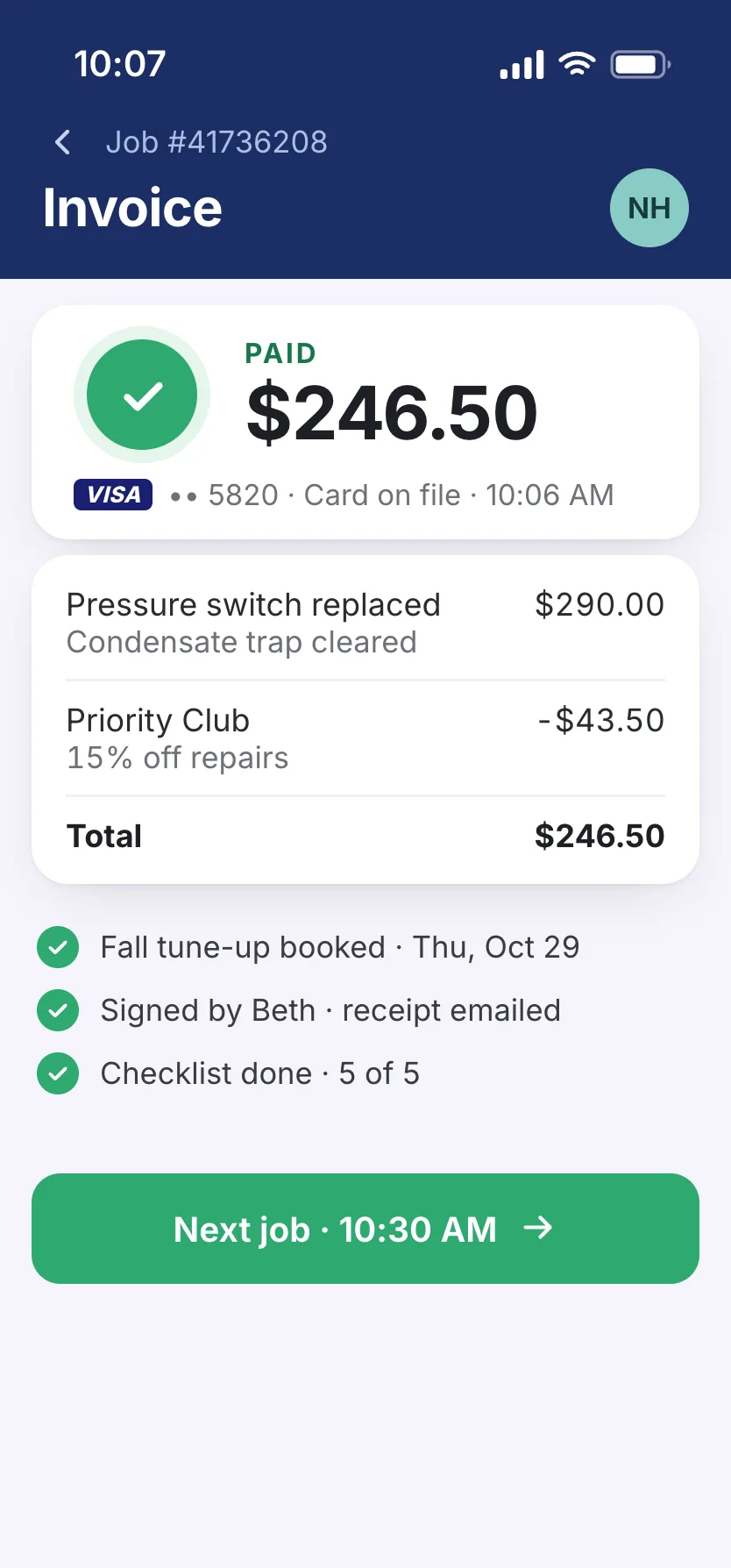
Nate clears the clogged trap, but the switch still won’t close, so he swaps it. He takes 15% off for Beth’s plan and charges her card on file.
- 5 · You
Check the margin
Tuesday night, you see Beth’s repair still made a 60% margin after her 15% plan discount.

Every feature is in the price.
It’s $600 a month for the software and $90 a month for each tech on the app. Neither goes up for 12 months after you sign, and you can still cancel any month. Everyone in your office logs in free.
- AI receptionist, 1,000 call minutes a month 1
- Online booking
- Good-better-best estimates
- Customer financing
- Memberships and maintenance plans
- Price book
- Live GPS from your techs’ phones
- Payment reminders

Our own shop · Superior Plumbing & Heating
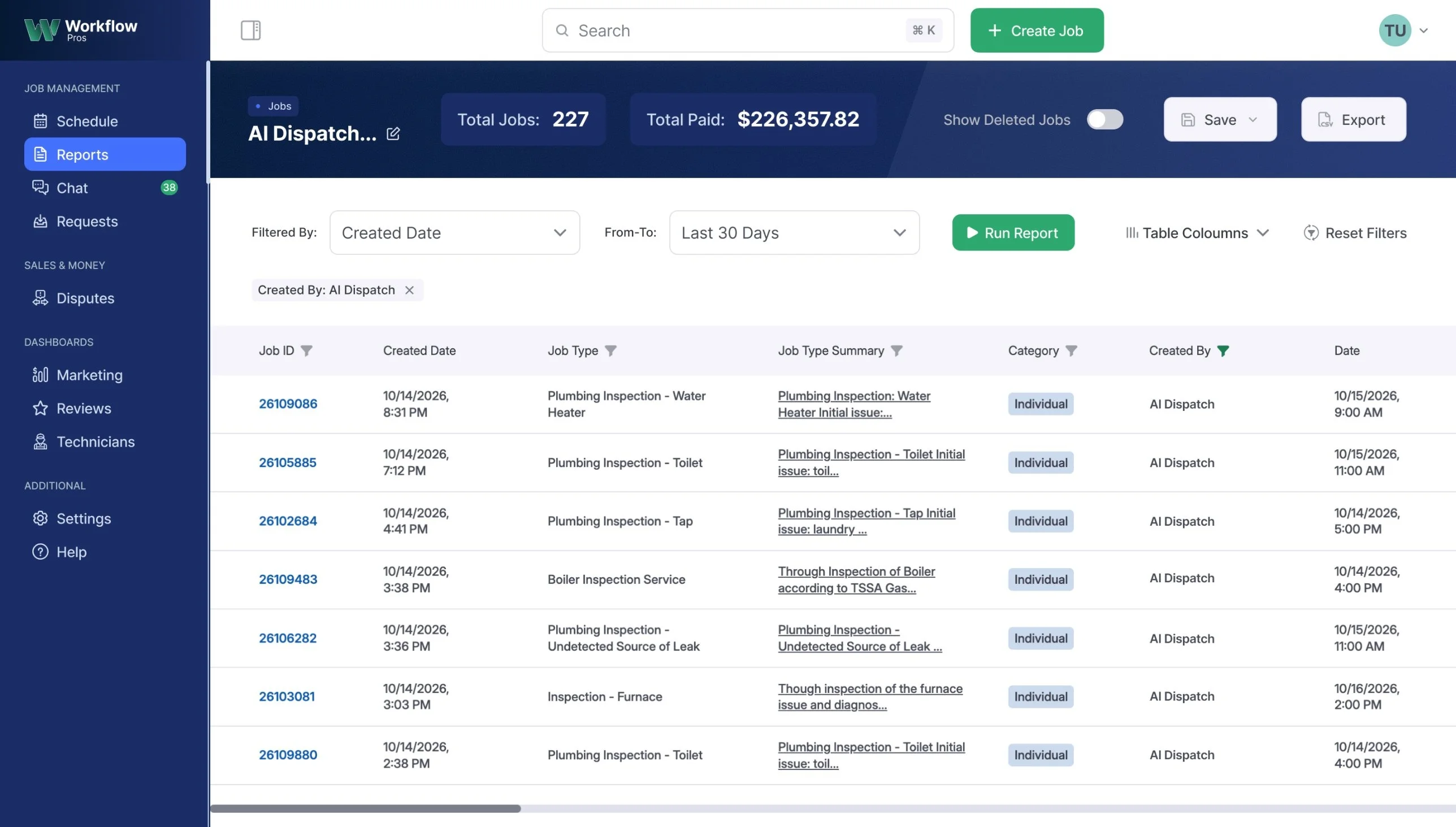
About 50 jobs a week from calls the office couldn’t get to.
Superior has 40 techs on 25 trucks, some two to a truck. The AI receptionist answers when the office is busy or closed.
- $226K collected on 227 jobs the AI booked in 30 days
From Superior’s report, about two months after it left ServiceTitan.

Try it free for 14 days
- No card to start
- 30 days money-back guarantee 3
- Month to month, no fee to cancel
- If you ever leave, you take your data with you at no charge
Switch without losing your members
We bring your shop over from ServiceTitan, Jobber, Housecall Pro, or a spreadsheet. It usually takes about a week, 15 days at most.
15 days
to switch 2
$0
Setup
$0
Moving your data
$0
Training
- Every customer comes over with their furnace and AC history, and your members keep their plans.
- We ask your old card processor to move your saved cards to ours.
- Your phone number moves over too, and it goes with you if you cancel.
- Invoices and payments sync with QuickBooks Online.
Before you switch mid-season
Can we switch in the middle of heating season?
Yes. If you go ahead after the demo, we start bringing over your customers and the equipment on file right away. Until you’re set up, nothing changes for your techs.
A customer has no heat at 9 p.m. in January. Then what?
The AI receptionist, included in your price, answers in your company’s name. No-heat calls you’ve marked as emergencies ring your on-call tech’s phone, and the rest get booked on your board.
Can my techs size and price a changeout at the house?
Yes. Your tech runs a Manual J on his phone: the house’s details fill in from the address, and he corrects anything that’s off. The app suggests the tonnage, the price, and matching models.
Can it figure commissions on the systems my techs sell?
Yes. The app figures each tech’s commission on what he sells, and it follows every lead he turns in all the way to the sale, so you know whose spiff it is.
What if my tech loses signal in a basement or an attic?
He can still pull up the job, fill out the work order, and get the homeowner’s signature. It all catches up once he’s back in range.
Get changeouts signed on site.
We’ll show you how on a 30-minute call.
- You’ll see a changeout like yours go from the Manual J to a signed proposal
- Two weeks free, and the clock doesn’t start till we’ve got you set up. No credit card needed
Pick a demo time
It’s a video call on Google Meet. Join from your phone or computer.
Show times in
Former time
We’ll start by asking how many techs you have and what software you’re on now, so we skip what you don’t need and keep it to 30 minutes.
We’ll call you to book it.