
Field service software and CRM for the trades
WorkflowPros vs. ServiceTitan
ServiceTitan doesn’t list its prices. We do:
$1,500 a month for 10 techs
$600 a month for the software, plus $90 a month for each tech. Your office logs in free.
Every feature comes in that price, with no package or Pro product to buy, and you can cancel anytime with no fee.
On a 30-minute call, we’ll run a job like yours through our app. We move you off ServiceTitan and train your office and techs online, free. Then try it free for 14 days. No credit card needed.
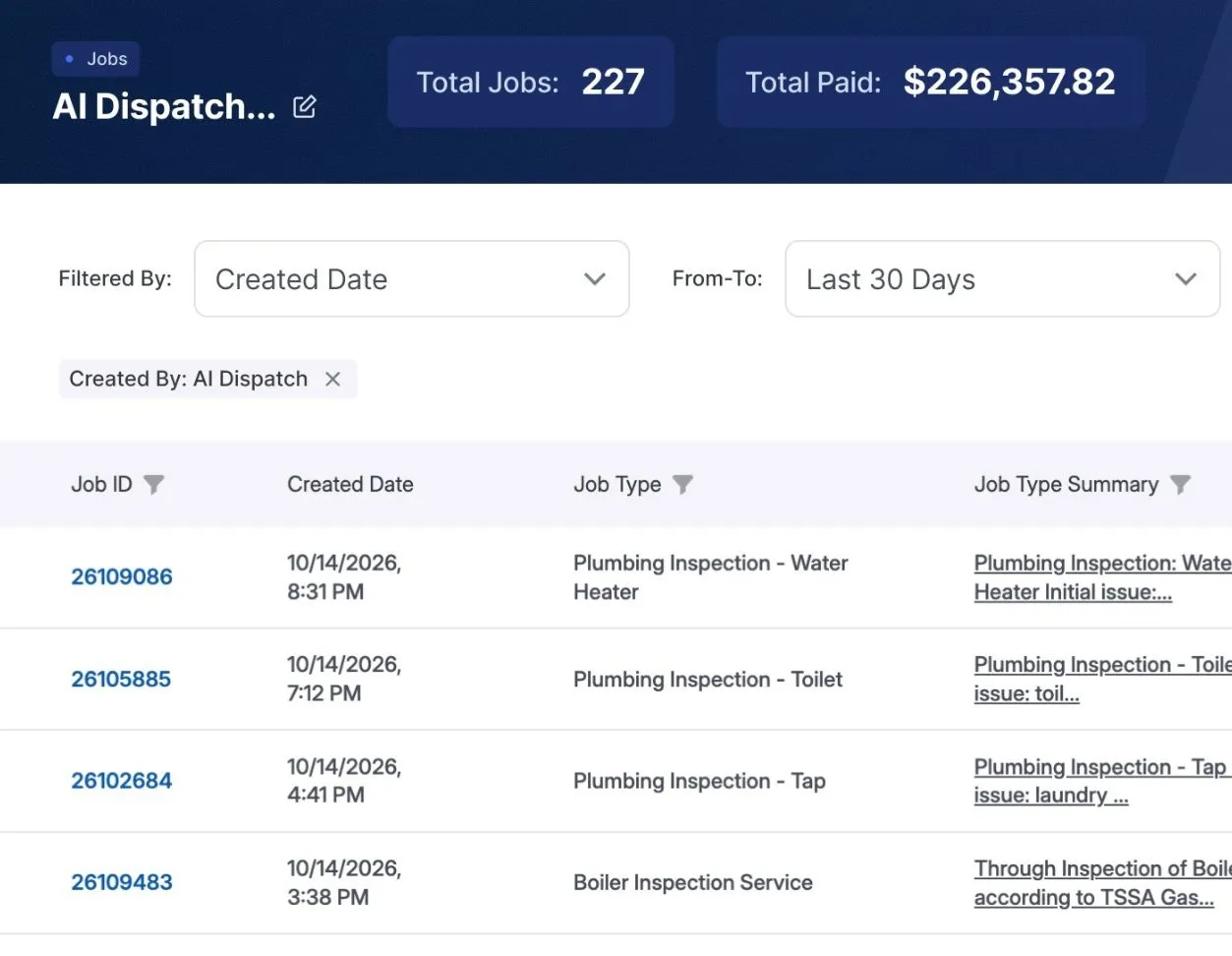
 $226K paid in 30 days on 227 jobs All booked by our AI receptionist We own Superior Plumbing & Heating, a Canadian shop with 40 techs. It moved over from ServiceTitan. The $226K is revenue, not profit. See the report

ServiceTitan’s side is from its own website, terms, and help center, checked November 11, 2026. See the sources
WorkflowPros
If you want out early
Cancel anytime
You pay month to month, with no fee to leave.
You owe the rest
If you leave before your term ends, you still owe all remaining payments. 1
If what you pay goes up
Software and per-tech fees locked
We can’t raise them for 12 months, then only with 60 days’ written notice.
Can rise, 30 days’ notice
Unless your written agreement or order form says otherwise, their fees can change. 2
Your data when you leave
Take it with you, free
Export it yourself, or ask us for it after you leave.
They may charge a fee
Once you’ve left, you have to ask them for an export. 3

Customers booking online
They pick their own time
They book on a page with your company name.
Sold separately
Scheduling Pro, their online booking, is a Pro add-on. 4
Calls you miss
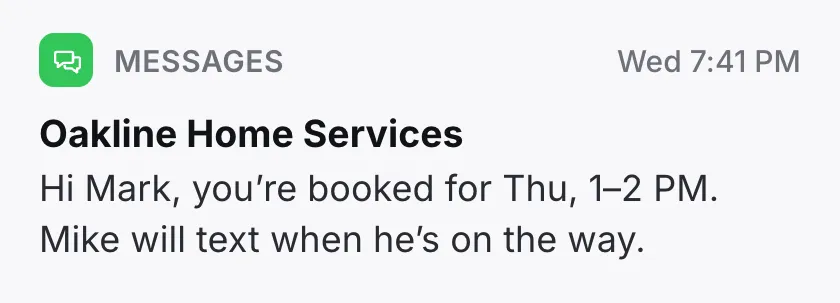
Our AI books jobs 24/7
1,000 minutes a month included, then $0.10 a minute.
Made for their phone system
Designed for residential shops on The Essentials + The Works. 5

When the app acts up
By phone, 24/7
Your support number is in the app. A real person picks up 24/7.
Phones closed on Sunday
Chat and email 24/7. After hours, leave a voicemail and press 1 for emergencies. 6
Your tech with no signal
Keeps working
Down in a basement, he still fills out forms, logs materials and gets signatures.
Most job steps work
Notes, photos, forms, and closing out a job work with no signal. 7
Getting set up
We do it for $0
We clean up and load your data while your office keeps booking jobs.
Their team helps import it
You answer their setup questions, then their team helps import your data. 8
Your phone number when you leave
It goes with you
If you cancel, you can port your business number to any phone company.
Ports out too
Port it before their phone plan’s end or written deadline, or risk losing it. 9
- The shops we own were running on WorkflowPros 2 to 14 business days after we got their data.
- Still under contract with ServiceTitan? We’ll time the move so you’re done before your contract ends.
- If you cancel within 30 days after we start billing you, we refund every dollar you’ve paid. Read the contract
Feature by feature
Everything here comes with WorkflowPros. With ServiceTitan, some of it starts on a bigger package or comes in a separate Pro product.
Scheduling & dispatch Tech suggestions with Dispatch Pro
- Move a job to another tech or time Included Every package
- The right tech suggested for each job Included With Dispatch Pro
Estimates & price book Estimates on site: Essentials package and up
- Estimates built on site, from the phone Included Essentials package and up
- A price book for your invoices Included Every package
Invoices & payments Payment reminders: Marketing Pro, a paid add-on
- Finished jobs turn into invoices Included Every package
- Automatic reminders on unpaid invoices Included Marketing Pro, a paid add-on
Customers & memberships Own membership perks: The Works package only. Past-customer offers: Marketing Pro, a paid add-on
- Membership plans with your own perks Included The Works package only
- Offers and emails to past customers Included Marketing Pro, a paid add-on
ServiceTitan’s side is from its own packages page, product pages, and help center. 10
What else WorkflowPros does for you
Can you afford another tech?
See what hiring a tech or buying a truck does to your numbers
Will cash be tight next month?
See when money will come in, based on how fast your customers pay
Techs going back to the same jobs?
Find out why jobs need a go-back, and what to change
Ready for the busy season?
See how many techs you’ll need next season
Are odd expenses eating your margin?
An alert when an expense looks wrong
No-shows leaving holes in the day?
Extra reminders for customers likely to miss the visit
Too busy to read your reports?
A plain-English summary of any report
Before you sign with ServiceTitan
Get these answered in writing:
Which package do I need to set my own membership perks and have techs quote on site? 10
Which features are sold separately, like online booking? 4
How long is the contract, and what do I owe if I leave early? 1
Can my fees go up before the contract ends? 2
On Jobber or Housecall Pro now?
Switching from ServiceTitan
We move your data
We bring over your customers, equipment, memberships, job history, and price book before your ServiceTitan contract ends, while you can still log in. Once it ends, you’d have to ask them for an export. 11
We check a test copy before you switch. You can look it over too.
We train your office and techs
We set up everyone’s logins and what each person sees, and train them online.
We connect your QuickBooks Online too.
Superior, our 40-tech shop, moved over from ServiceTitan in 7 business days 12
We counted from the day we got Superior’s data to the day it was all loaded. Yours depends on how much you have and what shape it’s in.
Before you cancel ServiceTitan
Keep your account paid up
If anything’s past due, they can lock you out without notice. 13
Export customers, jobs, and price book
You export all three to Excel. An admin or manager turns on job-list exports. 14
Write down important call details
If you use their phones, summaries and transcripts can’t be downloaded or exported. 15
Porting out? Save a past bill
Your new phone company may ask for one. Download it before your last day. 16
Still deciding?
Give us 30 minutes.
- We’ll ask how a job runs in your shop now, then show you one just like it in our app
- Two weeks free, and the clock doesn’t start till we’ve got you set up. No credit card needed
Pick a demo time
It’s a video call on Google Meet. Join from your phone or computer.
Show times in
Former time
We’ll start by asking how many techs you have and what software you’re on now, so we skip what you don’t need and keep it to 30 minutes.
We’ll call you to book it.
Where each line comes from
- 1 If you want out early. If you end your contract before your term is up, you owe a termination fee equal to all the remaining payments. ServiceTitan Terms of Use, section 5(c), dated Sep 16, 2026
- 2 If what you pay goes up. Unless a written agreement or order form says otherwise, they can change the fees for any feature if they give you at least 30 days’ notice. ServiceTitan Terms of Use, section 4(b), dated Sep 16, 2026
- 3 Your data when you leave. While you still have ServiceTitan, their help center shows how to export your customer list, job lists, and pricebook to Excel. Once you’ve left, you have to ask them for an export, and they may charge a service fee. ServiceTitan Terms of Use, section 5(e), dated Sep 16, 2026; ServiceTitan help center, exporting customers, dated Oct 14, 2026; ServiceTitan help center, exporting job lists, dated Oct 15, 2026; ServiceTitan help center, exporting your pricebook, dated Oct 15, 2026
- 4 Customers booking online. Scheduling Pro, their online booking for customers, is a Pro add-on. ServiceTitan help center, Scheduling Pro, dated Oct 15, 2026
- 5 Calls you miss. Their AI voice agent is billed by usage. It’s designed for residential home services companies in the US and Canada on The Essentials + The Works packages with an active Basic Phone integration or Phones Pro. ServiceTitan help center, AI voice agent, dated Oct 22, 2026
- 6 When the app acts up. Live chat and email support are open 24/7. Phone support runs Monday through Saturday and is closed on Sunday; after hours, you leave a voicemail and press 1 for their on-call emergency team. ServiceTitan help center, technical support, dated Oct 14, 2026
- 7 Your tech with no signal. With no signal, a tech can still do most things on a job: notes, photos, forms, equipment, invoice items, and closing it out. ServiceTitan help center, Field Mobile App, dated Oct 28, 2026
- 8 Getting set up. Before the kickoff call, you complete their discovery tasks, answering basic questions about each feature area, such as accounting and dispatch; preparing your price book and data early isn’t required. Then you work with their implementation consultant and data quality analysts to import your data. ServiceTitan help center, getting started, dated Oct 14, 2026
- 9 Your phone number when you leave. Their terms say your numbers can be ported out at any time, with no port-out fees from them, and that numbers not ported before your ServiceTitan phone subscription ends, or another deadline they give you in writing, may be permanently lost. ServiceTitan Terms of Use, telephony terms (f), dated Sep 16, 2026
- 10 Feature by feature. Their packages page shows which of Starter, Essentials, and The Works include each feature. Their Dispatch Pro page offers “job assignment suggestions,” and their help center says sending reminders automatically needs Marketing Pro, “a paid add-on.” ServiceTitan packages page; ServiceTitan Pro Products page; ServiceTitan Dispatch Pro page; ServiceTitan help center, Marketing Pro, dated Oct 15, 2026; ServiceTitan help center, unpaid balance reminders, dated Oct 15, 2026
- 11 Switching from ServiceTitan. When your subscription ends, your access to it and to the information stored in it ends too. After that, you can ask them for an export, and they may charge a service fee. ServiceTitan Terms of Use, sections 5(a) and 5(e), dated Sep 16, 2026
- 12 How long each of our shops took. Our page on how long switching takes
- 13 Keep your account paid up. Their terms say that if anything on your account is past due, they can suspend or end your access without notice. ServiceTitan Terms of Use, section 4(e), dated Sep 16, 2026
- 14 Export customers, jobs, and price book. Their help center says your full customer list and your price book download as Excel files, and job lists export to Excel once an admin or manager turns on exporting for the person doing it. ServiceTitan help center, exporting customers, dated Oct 14, 2026; ServiceTitan help center, exporting job lists, dated Oct 15, 2026; ServiceTitan help center, exporting your pricebook, dated Oct 15, 2026
- 15 Write down important call details. Their terms say the call summaries and transcripts their phone services make can’t be downloaded or exported, so they aren’t available outside ServiceTitan. ServiceTitan Terms of Use, telephony terms (e), dated Sep 16, 2026
- 16 Porting out? Save a past bill. Their help center on porting numbers out says that if your new phone carrier asks for a past invoice, you download copies from your billing settings, and you have to do it before your last day with ServiceTitan. ServiceTitan help center, porting numbers out, dated Oct 15, 2026
Our side comes from our contract’s Cancellation, Price changes, Your data, Support, and Your phone number sections. The rest comes from our Calls & bookings, Tech app, and Switching pages.
A real person picks up our support line 24/7. For email and other requests, our contract’s target for a first reply is 1 hour when calling, dispatching, or taking payments has stopped completely. It’s a target, not a guaranteed resolution time.
Plans and terms change, so check with ServiceTitan before you sign. ServiceTitan is a trademark of its owner, and WorkflowPros isn’t affiliated with it.