9 Jobber alternatives for 2026
By WorkflowPros · Updated
For shops past Jobber’s 10 users
We make WorkflowPros and run our four shops on it.
$600 a month plus $90 a tech covers memberships, dispatch, a price book, reports and free office logins.
Paid Jobber for the year? Free with us till then, 6 months max.
A live 30-minute Google Meet call, then free setup within 15 days. Most teams learn it in a day.

When you hire person number 11
Eight techs plus three in the office is 11 people. Jobber’s plans for 6 to 10 people include 10 users. The 11th costs extra. Job costing and two-way texting sit on Grow, custom reports on Plus. On WorkflowPros, a shop with 8 techs pays $1,320 a month for every tool, and the office logs in free.
- Connect
- Grow + Job costing + Two-way texting
- Plus + Custom reports
Why you’re leaving Jobber, and where to look
Start with the one thing you keep working around.
| Why you’re leaving | Where to look |
|---|---|
| Each hire raises your monthly bill | Service Fusion or ServiceM8: “Unlimited Users” on every paid plan |
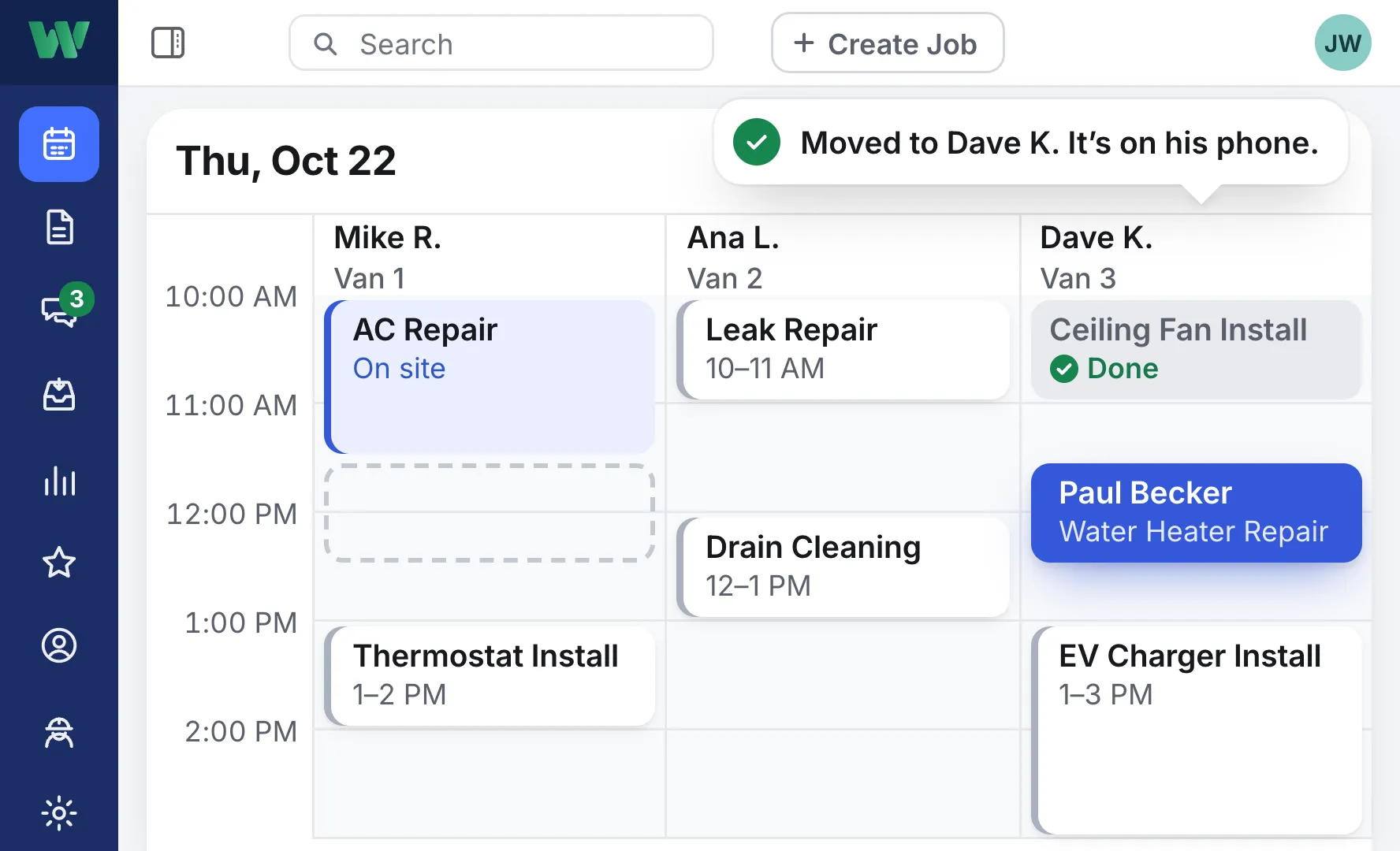
| Your dispatcher calls techs every time the day changes | WorkflowPros: drag a job to another tech, and it’s on their phone right away |
| You want every estimate to come off one price book | WorkflowPros: good-better-best options, built from the job |
| You want reports built your way | WorkflowPros or Kickserv: custom reports, on Kickserv from Run up |
| You run more than one location | Workiz: Ultimate is its plan for “Multi-location larger team & franchises” |
| You’re at four trucks and still adding | WorkflowPros: our shop Superior runs 25 trucks on it, some with two techs |
Staying on Jobber makes sense if you’re ten people or fewer and you get the job costing and texting you need on Grow.
Five of nine post prices, four quote on request
| Program | Best for | Per month |
|---|---|---|
| WorkflowPros Ours Office staff log in free | Multi-tech shops with memberships and a board | $600 a month $90 per tech |
| Jobber Yours now 10 users on each plan | Plans priced by team size | Connect $299 Grow $399 Plus $599 |
| ServiceTitan | Residential and commercial trade contractors | No posted price |
| FieldEdge | Multi-truck shops quoting flat rate | No posted price |
| Workiz | Growing teams up to franchises | No posted price |
| Housecall Pro Users: 1, 5 or 8 | Plans you can cancel anytime | Basic $79 Essentials $189 Max $329 |
| Service Fusion Unlimited users | Job costing from Plus up | Starter $259 Plus $399 Pro $649 |
| FieldPulse | Seat-based pricing with optional premium products | No posted price |
| Kickserv Users: 5, 10 or 20 | Plans for small, growing and established teams | Start $75 Run $149 Scale $249 |
| ServiceM8 Unlimited users, plans by jobs a month | Plans sized by new jobs a month | Starter $29 Growing $79 Premium $149 Premium Plus $349 |
Checked November 28, 2026. Regular month-to-month prices, before any sale. Jobber’s users and prices are for 6 to 10 people.
* Service Fusion: testing other prices on its website
What each one does for a shop of 11 or more
We’d look at the catch before the price, ours included.
1. WorkflowPros: memberships to reports for one price
Ours $600 a month plus $90 per tech
What you get Your customers, invoices and payments sync both ways with QuickBooks Online, and we connect it when you switch.
The catch Each tech you add raises the monthly bill, so price it for the team you expect next year.
- Membership invoices go out on schedule, and you get a call list before slow season.
- Your dispatcher sees who’s free and moves a job with one drag.
- One price book feeds every estimate, with good-better-best options.
- See whether labor or materials ate the profit.
$226K more revenue a month
At Superior, our 40-tech shop, the AI receptionist picks up when the office can’t.

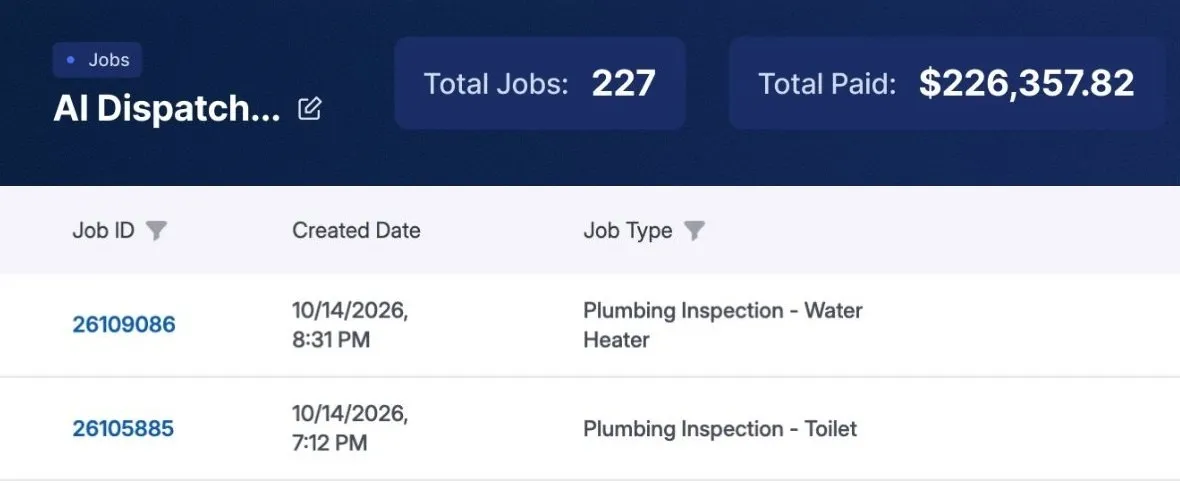
We moved Superior Plumbing & Heating, our shop in Canada, off ServiceTitan in 7 days. About two months later, Superior figures it books about 50 more jobs a week. Thirty come in while the office is busy and 20 at night, with the same calls and the same techs.
Revenue from the extra jobs, by Superior’s own count. How Superior counted it
Hiring soon? Book before the new hire starts, so they learn one program, not two.
See it in action2. ServiceTitan: from four trucks in one shop to thousands
No posted price
What you get A price book, reporting and customizable memberships are all in ServiceTitan’s Core Platform.
The catch Ask what the Core Platform costs for a shop your size.
WorkflowPros vs. ServiceTitan3. FieldEdge: flat rate built into every plan
No posted price
What you get FieldEdge puts basic memberships on Select and “advanced service agreements” on Premier and up.
The catch Six mobile app licenses come with Elite, four with Premier, two with Select. Ask what a seventh tech’s license costs.
WorkflowPros vs. FieldEdge4. Workiz: three plans sorted by team size
No posted price
What you get Workiz names Pro for a “Mid size team” and puts a price book on all three plans.
The catch Memberships, which Workiz calls “Service plans,” come on Ultimate only.
WorkflowPros vs. Workiz5. Housecall Pro: a posted price on all three plans
Basic $79, Essentials $189, Max $329 · Users: 1, 5 or 8
What you get If memberships are your reason, look at Max: Housecall Pro adds “recurring maintenance agreements” there.
The catch Housecall Pro includes 8 users on Max, then $35 a month each, and doesn’t say how those memberships get billed.
WorkflowPros vs. Housecall Pro6. Service Fusion: the same price at 11 people or 30
Starter $259, Plus $399, Pro $649 · Unlimited users
What you get On Pro, Service Fusion includes recurring invoicing, e-signatures and a customer web portal.
The catch Those three are add-ons on Starter and Plus, so price them in if you stop short of Pro.
WorkflowPros vs. Service Fusion7. FieldPulse: a custom quote for your team
No posted price
What you get A bigger shop can add a price book, fleet tracking and Engage, FieldPulse’s phone system.
The catch All three are among its optional premium products, so check which ones your quote covers.
What WorkflowPros includes8. Kickserv: dispatch mapping and GPS check-ins on Run
Start $75, Run $149, Scale $249 · Users: 5, 10 or 20
What you get Run includes 10 users, and the next step up is Scale, which Kickserv describes as “For teams with more technicians in the field to manage.”
The catch Kickserv shows yearly billing first, at 20% less, and its FAQ says those subscriptions “are not pro-rated or refundable.”
9. ServiceM8: your whole team on any paid plan
Starter $29, Growing $79, Premium $149, Premium Plus $349 · Unlimited users, plans by jobs a month
What you get For maintenance visits, ServiceM8 lists “Recurring Jobs & Maintenance Scheduling” on every plan.
The catch If you go over your plan’s jobs, you get 7 days of normal work, then ServiceM8 asks you to upgrade unless your month resets.

Off Jobber while your techs keep working
Once you decide to go ahead, we set you up within 15 days, free. Customers, equipment, memberships, job history and price book come over. You export customers and reports, and we show you where to click. We load a test copy first. We train your office and techs online. If your Jobber year is paid, WorkflowPros is free until it runs out, 6 months at most after setup.
WorkflowPros vs. JobberHow we picked these nine
- We looked at four published “Jobber alternatives” lists and started from the programs they share.
- FieldEdge is on none of them. We added it because every FieldEdge plan comes with a price book and flat-rate pricing.
- After ours, programs built for multi-truck shops come first, and those sold by jobs a month or to small teams come last.
- Every fact about WorkflowPros comes from our own website and our contract.
By WorkflowPros · Prices checked
What owners on Jobber ask
Which Jobber alternatives have memberships and a price book?
ServiceTitan lists both in its Core Platform. FieldEdge puts a price book on every plan, with memberships from Select up. Workiz has a price book on every plan and memberships on Ultimate. WorkflowPros has both for one price.
What happens on Jobber when I hire my eleventh person?
You’re one past the 10 users Jobber includes for a team of 6 to 10. You pay $29 a month for each extra user or move up to the plans for 11 to 15 people, which include 15.
What does ServiceTitan offer a shop coming off Jobber?
ServiceTitan builds for contractors from four trucks in one shop to thousands across locations. There’s no posted price, so get a number for your shop and compare it with ours.
Can I try WorkflowPros before I pay?
Yes. Your 14 free days start once we’ve set you up, not the day you book, and you pay nothing before they end. No credit card needed.
What if WorkflowPros isn’t right for us?
It’s month to month, and you can cancel anytime with no fee. If you cancel within 30 days after we start billing you, we refund every dollar you’ve paid. While you’re with us, you can export your data yourself anytime.
Read the contractDo I need new phones or tablets for my techs?
No. Techs use their own phones, and the office uses the computers it already has. There’s nothing to buy from us and no equipment deposit.
Sources we checked
Every price above comes from the company’s own pricing page.
- Jobber. Connect, Grow and Plus for a “6-10 people” team: how many users each includes. getjobber.com/pricing, checked .
- ServiceTitan. No prices, a “Get Pricing” button and who it’s for. servicetitan.com/pricing, checked .
- FieldEdge. Select, Premier and Elite: “Request Pricing,” who each is for and the mobile app licenses each includes. fieldedge.com/pricing, checked .
- Workiz. Standard, Pro and Ultimate: “Request pricing,” who each is for and what each includes. workiz.com/pricing-plans, checked .
- Housecall Pro. Basic, Essentials and Max: how many users each includes and what Max adds. housecallpro.com/pricing, checked .
- Service Fusion. Starter, Plus and Pro, paid monthly: what each one includes. Service Fusion is testing a version of the page with other amounts, or none. servicefusion.com/pricing, checked .
- FieldPulse. No prices, a “Get a Custom Quote” button and its optional premium products. fieldpulse.com/pricing, checked .
- Kickserv. Start, Run and Scale billed monthly: how many users each includes. The page opens on its annual prices. kickserv.com/pricing, checked .
- ServiceM8. Starter, Growing, Premium and Premium Plus at the “Standard Monthly Price”: the jobs a month each includes and its users. servicem8.com/us/pricing, checked .
- WorkflowPros. Our own pricing page.
Want memberships and the board in one program?
We’ll show you how.
- Watch a membership invoice go out and an estimate get built.
- Two weeks free, and the clock doesn’t start till we’ve got you set up. No credit card needed
Pick a demo time
It’s a 30-minute video call on Google Meet. Join from your phone or computer.
Show times in
Former time
We’ll start by asking how many techs you have and what software you’re on now, so we skip what you don’t need and keep it to 30 minutes.
We’ll call you to book it.
Plans and prices change, so check with each company before you sign. Each name is a trademark of its owner, and WorkflowPros isn’t affiliated with any of them.